
What is Better Everyday?
Better Everyday: Where Data Meets Daily Achievement - Transforming Goals into Living Heat Maps
(Click on the Better Everday tab to see the heat map!)
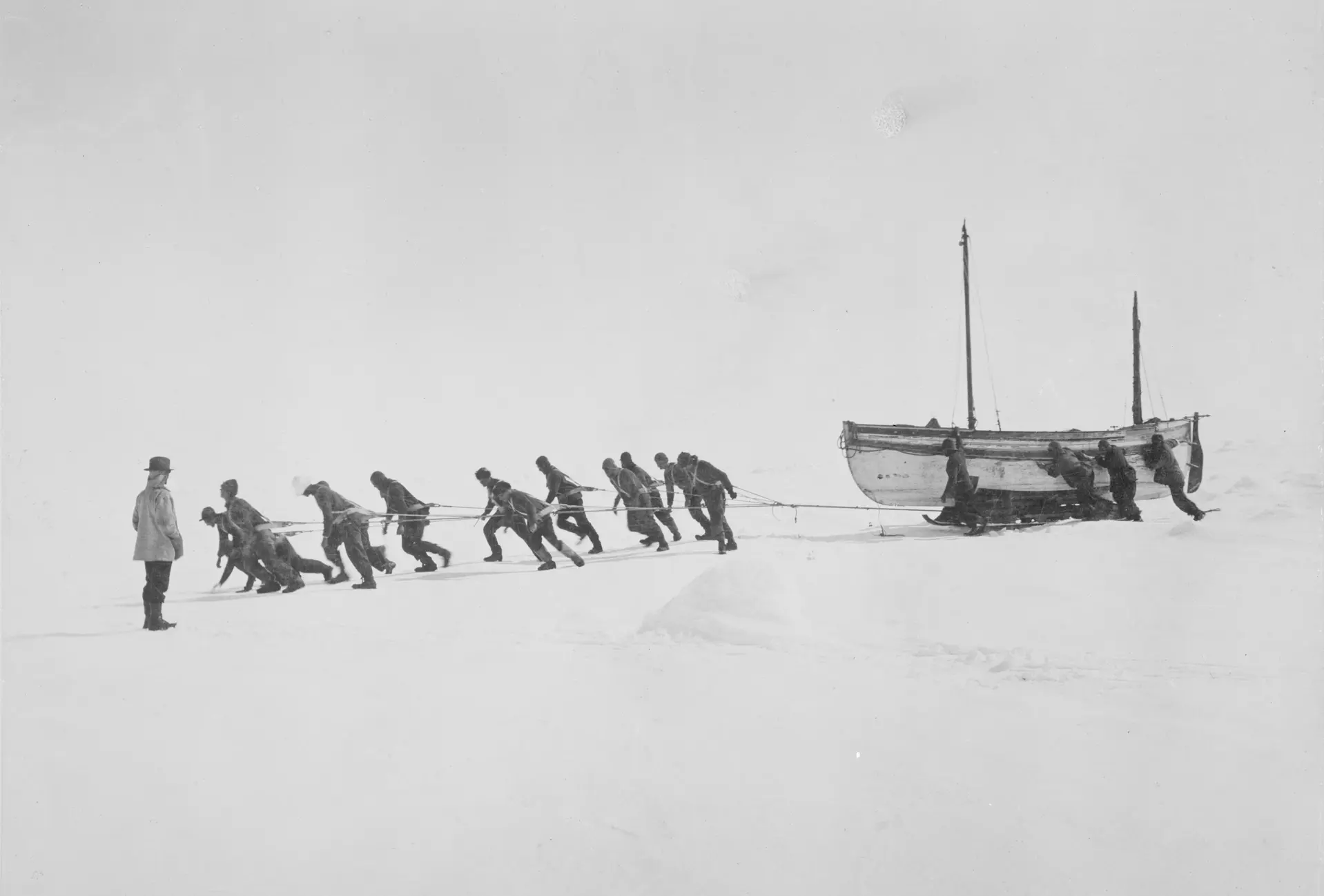
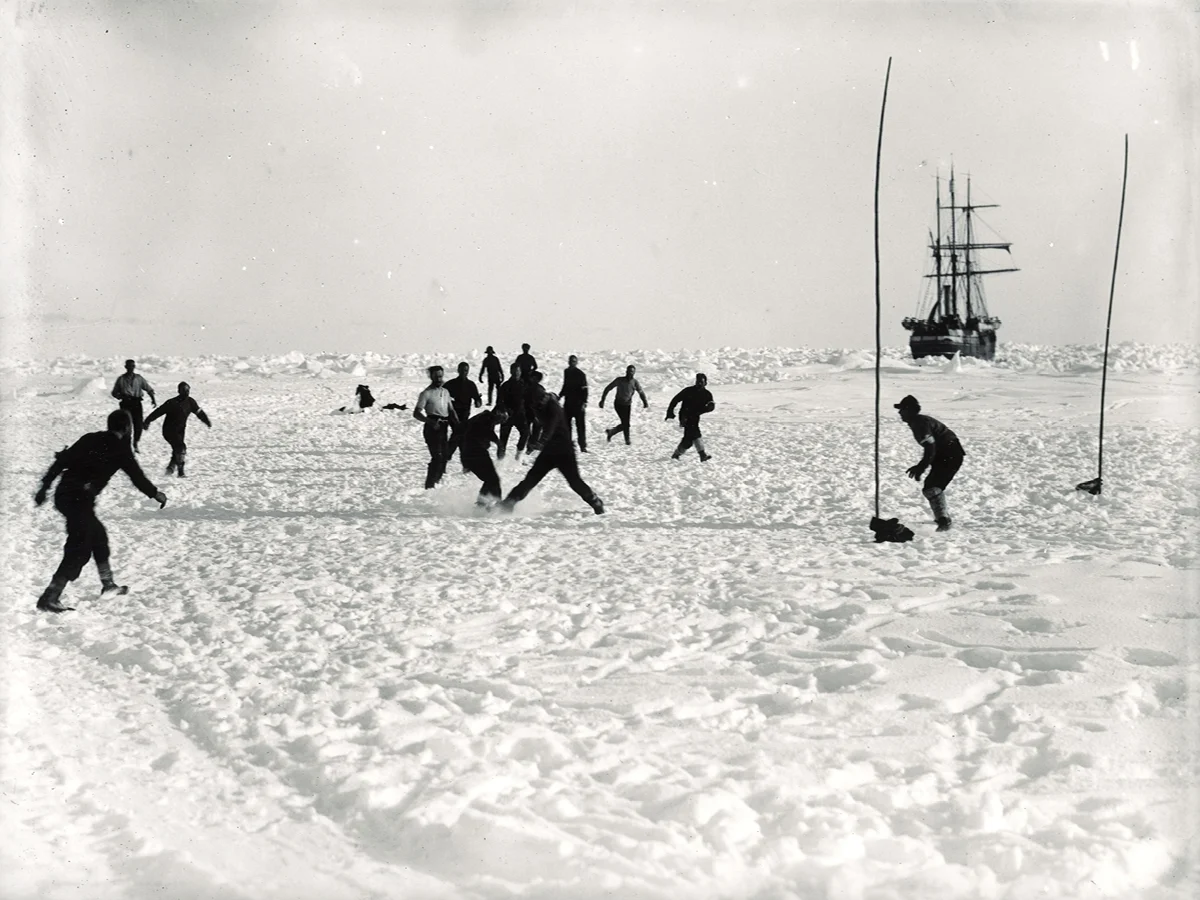
Image 1: Shackleton’s crew hauling their lifeboat across Antarctic ice, 1915-1916 Image 2: The same crew finding enjoyment in the face of adversity
Better Everyday is a program I created to track and elevate daily goals beyond routine patterns. The system focuses on seven key areas of personal growth that I’ve been consistently working on throughout the past year. Going forward, for 2025 I’ve implemented a structured tracking system to bring enhanced visibility to these practices. While these habits are already integrated into my weekly routine, the program addresses a specific challenge: the tendency for established habits to plateau once they become automatic.
Better Everyday isn’t designed for building new habits from scratch, as that could prove overwhelming. The program’s real value emerges through its daily tracking system. By maintaining visibility of these seven areas, it creates a path for pushing past complacency by taking consistent routines to the next level. Each day’s data contributes to a growing picture of progress, helping turn steady habits into lasting achievements.
The accountability system operates on a structured daily schedule. At 8 PM, I receive a notification outlining my seven goals and prompting me to assess my performance for the day. This evening timing allows for completion of any remaining goals while ensuring the day’s achievements are still fresh in memory. Once I submit my responses before the midnight deadline, the website automatically updates with that day’s score out of seven, maintaining an ongoing record of progress.
Why Have Image of Some Antarctic Crew?
The journey of the Endurance crew is one of the most extraordinary examples of perseverance and teamwork in history. Trapped in the unforgiving Antarctic, they not only survived against overwhelming odds but pushed through relentless trials that tested every ounce of their strength, resourcefulness, and resilience. Through impossible journeys across ice, open water, and treacherous terrain, their unwavering determination and commitment to one another became a testament to the power of leadership, grit, and unity.
What stands out to me is their ability to find moments of joy and camaraderie even in the face of adversity. It’s a reminder that hard work and teamwork don’t just help overcome challenges—they can also create shared strength and resilience. While I’ll probably never face anything as extreme as the Endurance crew’s journey, their story inspires me to work hard, support those around me, and keep pushing forward. Whenever I look at these images, I feel an energy boost, reminding me that perseverance and finding light in tough moments can make all the difference.
The book about this journey remains one of my favorites of all time, and I strongly encourage you to give it a read, click to open in Goodreads!

Building a Daily Progress Tracking Telegram Bot
This tutorial explains how to create your own personal Telegram bot for a Better Everyday journey
What You’ll Need
Before starting, make sure you have:
- A computer with Python installed
- A Telegram account on your phone or computer
- About 30 minutes to set everything up
What This Bot Does
Think of this bot as your personal accountability partner that lives in Telegram and can take on any name that motivates you (My messages come from “David Goggins Bot”). Each day, it will:
- Send you a message listing your goals
- Ask you to rate your day from 1-7
- Save your rating in a file on your computer
- Keep a record of all your daily scores
Step 1: Install the Required Software
Your computer needs a special library to talk to Telegram. Open your command prompt or terminal and type this command:
pip install python-telegram-bot
This command downloads and installs the tools your bot needs to communicate with Telegram’s servers.
Step 2: Set Up Your Bot Credentials
Before your bot can send messages, you need to register it with Telegram and get permission credentials.
# These are your bot's credentials - like an ID card and password
TOKEN = "YOUR_BOT_TOKEN_HERE"  # Replace this with your actual bot token
YOUR_USER_ID = 123456789       # Replace this with your Telegram user ID
The TOKEN is a long string of letters and numbers that Telegram gives you when you create a bot. Think of it like a password that proves your program is allowed to send messages. The USER_ID is your personal Telegram account number, which ensures only you can interact with your bot.
Step 3: Import the Tools Your Bot Needs
At the top of your bot file, you need to tell Python which tools to use. This is like getting all your ingredients ready before cooking:
from telegram.ext import Application, CommandHandler, MessageHandler, filters
import json
from datetime import datetime, timedelta
import logging
import sys
import os
Each of these imports brings in different capabilities:
telegram.extprovides the bot functionalityjsonhelps save your data in an organized formatdatetimehandles dates and timesloggingkeeps track of what your bot is doingsysandoshelp control how the program runs
Step 4: Set Up Activity Logging
Logging is like keeping a diary of everything your bot does. If something goes wrong, you can check the log to see what happened:
# Configure logging to track what the bot does
logging.basicConfig(
    level=logging.INFO,
    format='%(asctime)s - %(name)s - %(levelname)s - %(message)s',
    handlers=[
        logging.FileHandler('/path/to/your/logs/telegram_bot.log'),
        logging.StreamHandler(sys.stdout)
    ]
)
logger = logging.getLogger(__name__)
This code sets up two types of logging:
- File logging: saves messages to a file on your computer
- Console logging: displays messages on your screen while the bot runs
Replace /path/to/your/logs/telegram_bot.log with the actual location where you want to save the log file.
Step 5: Create Security Check Functions
Your bot should only respond to you, not random people who might find it. This function checks if the person messaging the bot is actually you:
async def start(update, context):
    # Check if the person messaging is you
    if update.effective_user.id != YOUR_USER_ID:
        logger.warning(f"Unauthorized access attempt from user {update.effective_user.id}")
        return
    # If it is you, ask for your rating
    await update.message.reply_text("How would you rate your day? (1-7)")
The async def means this function can handle multiple things at once (like receiving messages while sending responses). The security check compares the sender’s ID to your ID, and if they don’t match, the bot ignores the message.
Step 6: Build the Data Storage System
Your bot needs to save your daily ratings somewhere. This function organizes your data by year and date, making it easy to track your progress over time:
def save_rating(rating):
    # This is where your ratings will be saved
    file_path = '/path/to/your/data/activity-data.json'

    # Try to load existing data, or create new data structure if file doesn't exist
    try:
        with open(file_path, 'r') as f:
            ratings = json.load(f)
    except FileNotFoundError:
        # If no file exists yet, start with empty data
        ratings = {}
    except json.JSONDecodeError as e:
        # If the file is corrupted, log the error
        logger.error(f"JSON decode error: {e}")
        return "json_error"

    # Get today's date
    today = datetime.now()
    year_key = str(today.year)        # "2025"
    date_key = today.strftime("%m-%d") # "07-01"

    # Make sure there's a section for this year
    if year_key not in ratings:
        ratings[year_key] = {}

    # Save today's rating
    ratings[year_key][date_key] = rating

    # Write the updated data back to the file
    with open(file_path, 'w') as f:
        json.dump(ratings, f, indent=2)

    # Log that we successfully saved the rating
    logger.info(f"Saved rating {rating} for {year_key}-{date_key}")
    return "success"
This function creates a JSON file structure that looks like this:
{
  "2024": {
    "12-31": 6,
    "01-01": 7
  },
  "2025": {
    "07-01": 5,
    "07-02": 6
  }
}
Replace /path/to/your/data/activity-data.json with where you want to save your ratings file.
Step 7: Handle User Responses
When you send a number to rate your day, this function processes your message:
async def handle_rating(update, context):
    # Security check - only respond to you
    if update.effective_user.id != YOUR_USER_ID:
        return

    try:
        # Convert your message to a number
        rating = int(update.message.text)

        # Check if the number is between 1 and 7
        if 1 <= rating <= 7:
            # Try to save the rating
            save_status = save_rating(rating)

            if save_status == "success":
                # Confirm the rating was saved
                await update.message.reply_text(
                    f"Saved rating: {rating}/7\n"
                    f"Date: {datetime.now().strftime('%m-%d')}"
                )
                logger.info("Stopping bot after successful rating submission")

                # Shut down the bot after successful save
                os._exit(0)

            elif save_status == "json_error":
                # Tell you if there was a problem saving
                await update.message.reply_text(
                    "Error: Unable to save rating due to data file corruption"
                )
        else:
            # Ask for a valid number if outside 1-7 range
            await update.message.reply_text("Please send a number between 1-7")

    except ValueError:
        # If you sent something that's not a number
        await update.message.reply_text("Please send a number between 1-7")
This function does several things:
- Converts your text message into a number
- Checks if the number is valid (1-7)
- Saves the rating using the previous function
- Sends you a confirmation message
- Shuts down the bot after successfully saving your rating
Step 8: Create the Daily Reminder Message
This function sends you the initial message with your goals when the bot starts:
async def post_init(application: Application):
    """Send the daily reminder message when bot starts."""
    reminder_message = (
        "Did you get better today?\n"
        "1. No short form content\n"
        "2. Exercise or physical activity\n"
        "3. Healthy eating choices\n"
        "4. Productive work or meaningful activities\n"
        "5. Learning or skill development\n"
        "6. Reading or creative pursuits\n"
        "7. Quality time with others or self-care"
    )

    await application.bot.send_message(YOUR_USER_ID, reminder_message)
    logger.info("Daily reminder sent")
Customize the goals list to match your personal objectives. The post_init function runs automatically when the bot starts up, sending this message before waiting for your response.
Step 9: Set Up Time-Based Operation
Your bot should only run during certain hours and should automatically stop after a reasonable time:
def main():
    # Log when the bot starts
    logger.info(f"Bot starting at {datetime.now().strftime('%Y-%m-%d %H:%M:%S')}")

    # Calculate how long the bot should stay active
    now = datetime.now()
    midnight = (now + timedelta(days=1)).replace(hour=0, minute=0, second=0, microsecond=0)
    seconds_until_midnight = int((midnight - now).total_seconds())

    # Don't run longer than 6 hours or until midnight, whichever is shorter
    timeout = min(seconds_until_midnight, 6 * 60 * 60)

    # Build the bot application
    application = (
        Application.builder()
        .token(TOKEN)                # Use your bot token
        .post_init(post_init)        # Send reminder when starting
        .build()
    )

    # Tell the bot what functions to use for different types of messages
    application.add_handler(CommandHandler("start", start))
    application.add_handler(MessageHandler(filters.TEXT & ~filters.COMMAND, handle_rating))

    # Start the bot and keep it running until timeout or until you respond
    application.run_polling(timeout=timeout)
This function:
- Calculates how long the bot should stay active
- Sets up the bot with your token and reminder function
- Connects your message handling functions
- Starts listening for messages with a time limit
Step 10: Add Operating Hours Restriction
You probably don’t want the bot running at 3 AM, so add this time restriction:
if __name__ == '__main__':
    current_hour = datetime.now().hour

    # Only run between 10 AM and midnight
    if 10 <= current_hour < 24:
        main()
    else:
        logger.info("Outside rating window (10 AM - midnight). Not starting.")
This code checks the current time and only runs the bot between 10 AM and midnight. You can adjust these hours to match your schedule.
Complete Bot Script
Here’s the full bot code with all components integrated:
#!/usr/bin/env python3
from telegram.ext import Application, CommandHandler, MessageHandler, filters
import json
from datetime import datetime, timedelta
import logging
import sys
import os

# Configure logging
logging.basicConfig(
    level=logging.INFO,
    format='%(asctime)s - %(name)s - %(levelname)s - %(message)s',
    handlers=[
        logging.FileHandler('/path/to/your/logs/telegram_bot.log'),
        logging.StreamHandler(sys.stdout)
    ]
)
logger = logging.getLogger(__name__)

# Configuration - Replace these with your actual values
TOKEN = "YOUR_BOT_TOKEN_HERE"
YOUR_USER_ID = 123456789

async def start(update, context):
    if update.effective_user.id != YOUR_USER_ID:
        logger.warning(f"Unauthorized access attempt from user {update.effective_user.id}")
        return
    await update.message.reply_text("How would you rate your day? (1-7)")

def save_rating(rating):
    file_path = '/path/to/your/data/activity-data.json'

    try:
        with open(file_path, 'r') as f:
            ratings = json.load(f)
    except FileNotFoundError:
        ratings = {}
    except json.JSONDecodeError as e:
        logger.error(f"JSON decode error: {e}")
        return "json_error"

    today = datetime.now()
    year_key = str(today.year)
    date_key = today.strftime("%m-%d")

    if year_key not in ratings:
        ratings[year_key] = {}

    ratings[year_key][date_key] = rating

    with open(file_path, 'w') as f:
        json.dump(ratings, f, indent=2)

    logger.info(f"Saved rating {rating} for {year_key}-{date_key}")
    return "success"

async def handle_rating(update, context):
    if update.effective_user.id != YOUR_USER_ID:
        return

    try:
        rating = int(update.message.text)
        if 1 <= rating <= 7:
            save_status = save_rating(rating)
            if save_status == "success":
                await update.message.reply_text(
                    f"Saved rating: {rating}/7\n"
                    f"Date: {datetime.now().strftime('%m-%d')}"
                )
                logger.info("Stopping bot after successful rating submission")
                os._exit(0)
            elif save_status == "json_error":
                await update.message.reply_text("Error: Unable to save due to data corruption")
        else:
            await update.message.reply_text("Please send a number between 1-7")
    except ValueError:
        await update.message.reply_text("Please send a number between 1-7")

async def post_init(application: Application):
    await application.bot.send_message(
        YOUR_USER_ID,
        (
            "Did you get better today?\n"
            "1. No short form content\n"
            "2. Exercise or physical activity\n"
            "3. Healthy eating choices\n"
            "4. Productive work or meaningful activities\n"
            "5. Learning or skill development\n"
            "6. Reading or creative pursuits\n"
            "7. Quality time with others or self-care"
        )
    )
    logger.info("Daily reminder sent")

def main():
    logger.info(f"Bot starting at {datetime.now().strftime('%Y-%m-%d %H:%M:%S')}")

    now = datetime.now()
    midnight = (now + timedelta(days=1)).replace(hour=0, minute=0, second=0, microsecond=0)
    seconds_until_midnight = int((midnight - now).total_seconds())
    timeout = min(seconds_until_midnight, 6 * 60 * 60)

    application = (
        Application.builder()
        .token(TOKEN)
        .post_init(post_init)
        .build()
    )

    application.add_handler(CommandHandler("start", start))
    application.add_handler(MessageHandler(filters.TEXT & ~filters.COMMAND, handle_rating))

    application.run_polling(timeout=timeout)

if __name__ == '__main__':
    current_hour = datetime.now().hour
    if 10 <= current_hour < 24:
        main()
    else:
        logger.info("Outside rating window (10 AM - midnight). Not starting.")
Setting Up Your Bot
To use this bot, you need to:
- Get a Bot Token: Message @BotFather on Telegram, create a new bot, and copy the token it gives you
- Find Your User ID: Message @userinfobot on Telegram to get your user ID number
- Update the Code: Replace
YOUR_BOT_TOKEN_HEREand123456789with your actual token and user ID - Set File Paths: Change
/path/to/your/logs/and/path/to/your/data/to real folders on your computer - Customize Goals: Edit the reminder message to include your personal goals
- Save the File: Save this code as
daily_bot.pyor similar - Run Daily: Set up your computer to run this script once per day
How It Works Day-to-Day
Once set up, here’s what happens each day:
- The script starts and checks if it’s the right time to run
- Your bot sends you a Telegram message with your goals
- You respond with a number from 1-7 rating your day
- The bot saves your rating and confirms it was recorded
- The bot shuts down until you run it again tomorrow
Your ratings accumulate in the JSON file, creating a long-term record of your daily progress that you can review anytime.
Troubleshooting
If something goes wrong:
- Check the log file for error messages
- Verify your bot token and user ID are correct
- Make sure the file paths exist on your computer
- Ensure you have permission to write files in the specified locations
This simple but effective system helps maintain consistent daily progress tracking through your Telegram account, giving you a convenient way to monitor your personal development over time.